

Text-to-speech player with buttons Play, Pause, Stop and voice choice
I've been quarreling with this thing for quite a while, so before I begin to forget it, I write down some notes and reminders.
SpeechSynthesis, what does it do? Speak, read the text of a web page and tell it to you, it practically makes your web pages talk.
Everything runs on the MDN API and around this SpeechSynthesisUtterance, it's all extremely difficult, complex and messy, luckily it's all well explained here: https://developer.mozilla.org/en-US/docs/Web/API/SpeechSynthesis, but even if everything is well explained, being able to do something that works the way you want, is a mess.
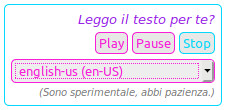 What I wanted was a little text-to-speech Player with the buttons Play, Pause, and Stop, and the possibility to choose the one you like most from the voices of the device. The demo of the player can be found here.
Yes, even the voice, because if you don't choose a voice the player uses the default one, and in English it works enough, but the Italian text read by a German can't be heard, and I don't know why, but on my linux pc the default voices are German and Bangladeshi... it really sucks...
Some snippet of code and some demos can be found online, but they often don't work or don't have everything I want.
So, I did it... not alone, javascript disgusts me so it would have been impossible, I took some demos, a piece of code here, another there and with the help of someone who understands something about javascript I managed to put together a small player that works the way I want it.
It all started here: https://www.hongkiat.com/blog/text-to-speech/, he made a nice player, the first one I found working after thousands of online searches. The text is read from any element of the page, and there are the three buttons Play, Pause and Stop.
(Pause sometimes doesn't work, it's experimental... nothing can be done... it will improve over time.)
Nice, cute, but read Italian in German, and it was really horrible.
So I get some code from here: https://developer.mozilla.org/en-US/docs/Web/API/SpeechSynthesis, here we are on the official website of the MDN API, they are big and serious and they also give you a nice, fully functional demo, but it is mostly a demo demonstrative, beautiful and complete, but for what I wanted to do with, it was exaggerated, difficult to dismantle, and above all it doesn't have the buttons Play, Pause and Stop...
Pratically their demo is only demonstrative, you see everything you can do, but you can do nothing whit it.
However, in their demo you can choose the voice to use from the voices available in the device.
So the rest of my work was to combine the buttons Play, Pause and Stop and the option to choose a voice.
This code came out:
//https://www.hongkiat.com/blog/text-to-speech/
onload = function() {
    if ('speechSynthesis' in window){
        var synth = speechSynthesis;
        var flag = false;

        //stop when change page ???(not sure)
            if(synth.speaking){ /* stop narration */
                /* for safari */
                flag = false;
                synth.cancel();
            }


        /* references to the buttons */
        var playEle = document.querySelector('#speechplay');
        var pauseEle = document.querySelector('#speechpause');
        var stopEle = document.querySelector('#speechstop');

        /* click event handlers for the buttons */
        playEle.addEventListener('click', onClickPlay);
        pauseEle.addEventListener('click', onClickPause);
        stopEle.addEventListener('click', onClickStop);

// select voices////
//var synth = window.speechSynthesis;

var voiceSelect = document.querySelector('#voices');

var voices = [];

function populateVoiceList() {
  voices = synth.getVoices().sort(function (a, b) {
      const aname = a.name.toUpperCase(), bname = b.name.toUpperCase();
      if ( aname < bname ) return -1;
      else if ( aname == bname ) return 0;
      else return +1;
  });
  var selectedIndex = voiceSelect.selectedIndex < 0 ? 0 : voiceSelect.selectedIndex;
  voiceSelect.innerHTML = '';

    //get cookie voice
    //var cookievoice = getCookie('SpeechSynthesisVoice');
    var cookievoice = sessionStorage.getItem("SpeechSynthesisVoice");

  for(i = 0; i < voices.length ; i++) {
    var option = document.createElement('option');
    option.textContent = voices[i].name + ' (' + voices[i].lang + ')';

    if(voices[i].default) {
      option.textContent += ' -- DEFAULT';
    }

    option.setAttribute('data-lang', voices[i].lang);
    option.setAttribute('data-name', voices[i].name);

    //add selcted to option if if cookievoice
    if (cookievoice === voices[i].name) {
        selectedIndex = i;
        option.setAttribute('selected', 'selected');
    }
    voiceSelect.appendChild(option);
  }
  voiceSelect.selectedIndex = selectedIndex;
}

populateVoiceList();
if (speechSynthesis.onvoiceschanged !== undefined) {
  speechSynthesis.onvoiceschanged = populateVoiceList;
}
//end select voices

        function onClickPlay() {
            if(!flag){
                flag = true;
                utterance = new SpeechSynthesisUtterance(document.querySelector('#texttospeech').textContent);
                //utterance.voice = synth.getVoices()[0];

                //add voice//
                var selectedOption = voiceSelect.selectedOptions[0].getAttribute('data-name');
                    for(i = 0; i < voices.length ; i++) {
                      //if(voices[i].name === 'Google UK English Female') {
                      if(voices[i].name === selectedOption) {
                        utterance.voice = voices[i];
                        sessionStorage.setItem("SpeechSynthesisVoice", selectedOption);
                        break;
                      }
                    }

                voiceSelect.onchange = function(){
                    onClickStop();
                    onClickPlay();
                }
                //and add voice

                utterance.onend = function(){
                    flag = false;
                };
                synth.speak(utterance);

                //fix stop after a while bug
                let r = setInterval(() => {
                  console.log(speechSynthesis.speaking);
                  if (!speechSynthesis.speaking) {
                    clearInterval(r);
                  } else {
                    speechSynthesis.resume();
                  }
                }, 14000);
                //end fix stop after a while bug
            }
            if(synth.paused) { /* unpause/resume narration */
                synth.resume();
            }
        }
        function onClickPause() {
            if(synth.speaking && !synth.paused){ /* pause narration */
                synth.pause();
            }
        }
        function onClickStop() {
           if(synth.speaking){ /* stop narration */
                /* for safari */
                flag = false;
                synth.cancel();
            }
        }
    }
  else {
		msg = document.createElement('h5');
		msg.textContent = "Detected no support for Speech Synthesis";
		msg.style.textAlign = 'center';
		msg.style.backgroundColor = 'red';
		msg.style.color = 'white';
		msg.style.marginTop = msg.style.marginBottom = 0;
		document.body.insertBefore(msg, document.querySelector('#SpeechSynthesis'));
  }
}
A jsfiddle here: https://jsfiddle.net/sb5wfomk/2/
What I did was to start with the simplest version, integrate in the demo with the buttons a part of code taken from MDN that allows you to create a select with the voices available on the device, and tell the Play button when I select a voice on the select, start using that.
It sounds simple, but I lost two weeks... probably also because javascript disgusts me and I don't know it and I don't want to use it.
In addition to this, I also encountered another couple of problems that blocked me, like that idiot of Chrome when you change or update a page, it doesn't understand that he have to stop, I added a piece of code that first of all stops.
And there is a little problem, already known, always with Chrome that if the text is long it stops after a while, fortunately the code to solve it is also known.
And I hated having to select the voice each time, so I added a SessionStorage that remembers the last voice you selected and at the next Play starts with that. (SessionStorage because cookies that idiot of chrome seem to not want to use them anymore)
The little player that came out of it is nice, cute, but not perfect...
Everything is still experimental, on my pc everything works well on firefox and chrome even though firefox has some "strange" voices and chrome has lots of little and strange problems.
On phones and tablets everything seems to work well, at least in the ones I've tried so far, the voices are even prettier.
Compatibility is not absolute and on older browsers you forget it.
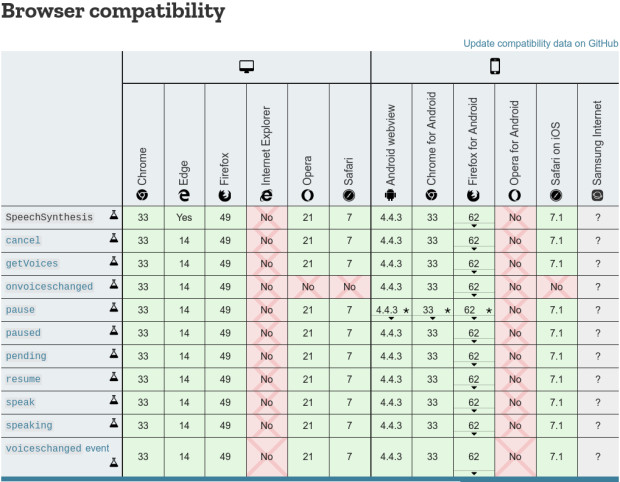
But for what I was hoping to do with it, it goes well.
It's not perfect, but for what I wanted to do, we're around 96-98%.
The guys in this facebook group gave me a hand: badass programmer https://www.facebook.com/groups/badassprogrammer
It's a fairly new group, grown very fast and very promising, and they are practically the only ones that helped me understand something, not even on stackoverflow they didn't help me much. Thanks.
Rating: 5 out of 5 by 9816 visitors